OpenRouter Docs Site — Feature Audit (draft)
Task D.01 (../execution/track-d-developer-docs.md). What OpenRouter’s documentation site does as a product, as opposed to its API, which openrouter-api-comparison.md covers. Each feature is marked match, match differently or skip, with the reason. It feeds the docs design pass (D.02) and the build (D.03–D.10).
Status: human pass and screenshot pass done (2026-11-07, agent, headless Chromium). The first pass (2026-10-26) read the page source, llms.txt, llms-full.txt and the .md variants. The second pass (2026-11-07) re-read the HTML and then took real screenshots at 1440x900 (desktop) and 390x844 at 2x (mobile), stored in assets/openrouter-docs/. Facts below marked (seen) come from those screenshots or from interaction. Anything still marked (inferred) was not seen. No cookie banner appeared, and we were signed out throughout.
Platform: the site is built on Mintlify (named throughout the page configuration), with PostHog analytics. Most features below are Mintlify’s; we build the ones we match ourselves in the custom docs app (decisions log, Developer docs site).
1. Features
Section titled “1. Features”| # | Feature | What OpenRouter has (evidence) | Ours | Why |
|---|---|---|---|---|
| 1 | llms.txt index |
/docs/llms.txt, ~500 links grouped by topic |
Match | AI tools are a main way developers read docs now; cheap to generate at build (D.04) |
| 2 | llms-full.txt |
/docs/llms-full.txt returns 200 |
Match | One file an agent can load whole; also the grounding for our Ask AI (D.10) |
| 3 | Markdown version of every page | /docs/quickstart.md served as text/markdown |
Match | Same reason; D.04 |
| 4 | Page menu: Copy page, View as Markdown, Open in ChatGPT / Claude / Perplexity | Mintlify contextual options copy, view, chatgpt, claude, perplexity, shown in the page header |
Match (Copy, View, ChatGPT, Claude; Perplexity optional) | Low cost, high use. D.04 |
| 5 | AI assistant (“Ask a question…”) | A chat panel (chat-assistant-textarea) and an AI chat entitlement in the page config |
Match, after launch | Decided as a nice-to-have with a cost cap (D.10) |
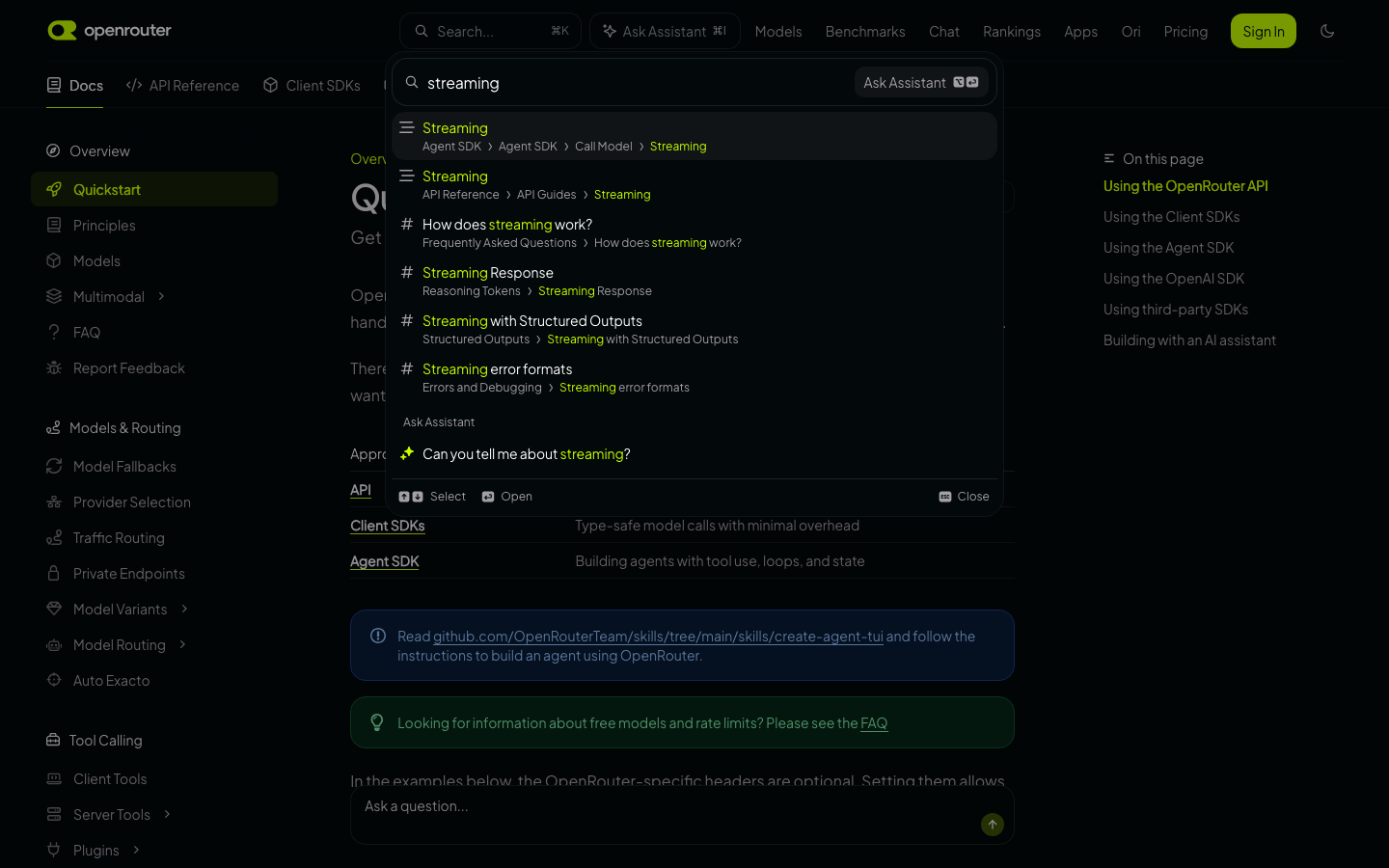
| 6 | Search | Search button in the top bar (search-bar-entry, plus a mobile variant); opens a modal. Shortcut and result layout not verified |
Match | Pagefind, ⌘K / Ctrl+K (D.05) |
| 7 | Language tabs on code | Python, TypeScript, Shell, Go seen | Match differently | curl, Python, TypeScript at launch (api-docs-scope §4). Go and others only if customers ask |
| 8 | Package-manager tabs | npm, pnpm, yarn, bun, deno, pip | Match | Install snippets for the OpenAI and Anthropic SDKs (D.03) |
| 9 | Code blocks: copy, line numbers, expandable | Copy buttons; lines and expandable attributes |
Match | D.03 |
| 10 | Callouts (note, tip, warning) | NOTE and TIP admonitions | Match | D.03 |
| 11 | API reference from OpenAPI | Reference pages generated from their spec; request/response schemas; examples per status; spec downloadable | Match | From our curated spec, only documented endpoints (D.06, D.07) |
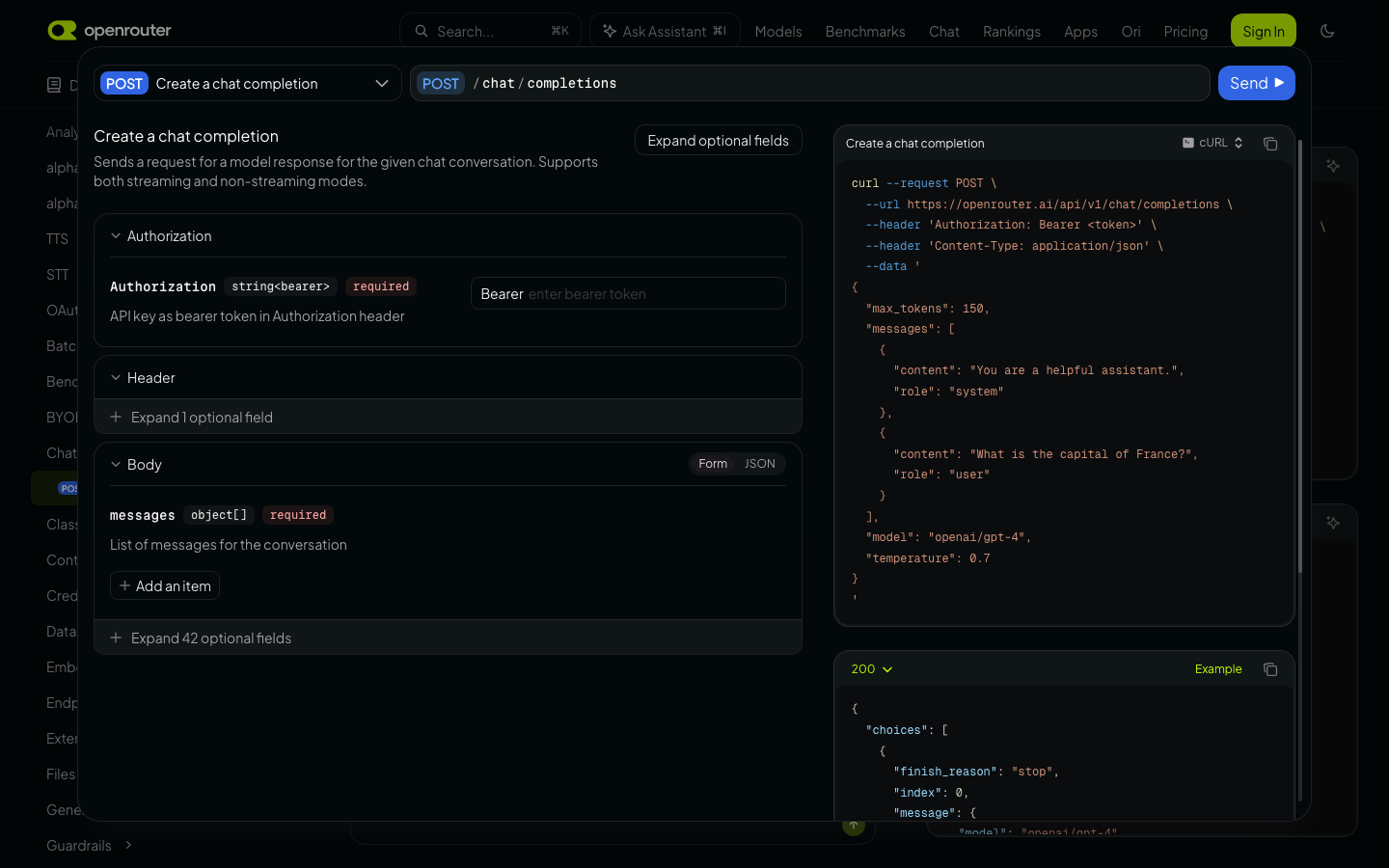
| 12 | “Try it” live API playground | Try it button (tryit-button, Mintlify API playground) on reference pages |
Match differently | Ours is a code-generating Request Builder that never sends a request: api.router.africa has no CORS, and keys must not be pasted into a web page (decided). Mintlify avoids CORS by proxying through its own servers; revisit only if customers ask |
| 13 | Request Builder | Linked from the quickstart (“interactive Request Builder”) | Match | Code-only, as above (D.07) |
| 14 | “Was this page helpful?” feedback | Thumbs up/down, contextual feedback with optional email, agent feedback | Match (simple) | Thumbs plus an optional comment, sent to our own endpoint, no third party. Add to D.03 |
| 15 | Table of contents (“On this page”) | Present | Match | D.03 |
| 16 | Breadcrumbs, next page link | Present | Match | D.03 |
| 17 | Changelog | Present in navigation | Match | D.08 |
| 18 | Theme (dark/light) | Config appearance.default = dark; a theme menu trigger in the page (theme-preference-menu-trigger); choice stored in localStorage (isDarkMode); 19 prefers-color-scheme rules. OpenRouter defaults to dark, with a toggle |
Match differently | Operator decision 2026-11-07: dark and light, following the device setting by default, with a toggle, like the marketing site. OpenRouter forces dark by default |
| 19 | Cookbook / guides by use case | Cookbook section (~64 pages in llms.txt) |
Skip at launch | Our scope is the API contract; use-case guides come later |
| 20 | Client SDKs (TS, Python, Go) | Own SDK docs (~113 pages) | Skip | We have no SDK of our own: customers use the OpenAI and Anthropic SDKs unchanged (the “one line” promise) |
| 21 | MCP / editor integrations | Two things. (a) A guide, MCP (/guides/overview/mcp-server): OpenRouter hosts a remote MCP server (mcp.openrouter.ai/mcp, OAuth) that lets an assistant look up models, prices, credits and docs. It is a product, not a docs feature. (b) The page config has a WEB_MCP entitlement, which is Mintlify’s “docs as an MCP server”; we did not see it surfaced in the page |
Skip | (a) We have no such server and it is outside the launch scope. (b) llms.txt, llms-full.txt and .md pages (rows 1-3) already serve agents; revisit a docs MCP only if customers ask |
| 22 | Analytics | PostHog | Match differently | A privacy-friendly page counter at most; no third-party tracking on docs |
| 23 | Top tabs plus grouped sidebar | Five top tabs (Docs, API Reference, Agent SDK, Client SDKs, Cookbook); each tab has a left sidebar of collapsible groups with icons | Match differently | Fewer tabs: Guides, API Reference, Changelog. Sidebar groups inside each |
| 24 | Code block copy button and syntax highlighting | Shiki highlighting; a copy button on each block (copy-code-button); CodeGroup tab bars |
Match | D.03; same as row 9 |
| 25 | Code snippet feedback | CODE_SNIPPET_FEEDBACK enabled in the page config |
Skip | Page-level thumbs (row 14) are enough |
| 26 | “Ask Assistant” on code blocks | Code blocks carry an “Ask Assistant” label tied to the chat panel | Skip at launch | Comes with Ask AI (D.10) |
| 27 | Announcement banner | Banner slot in the layout (--banner-height) |
Skip | Not needed at launch; the status page link covers incidents |
| 28 | Narration (read aloud) | NARRATION enabled in the page config |
Skip | Not a developer docs need |
2. What this changes in the plan
Section titled “2. What this changes in the plan”- D.03: add the “Was this page helpful?” widget (thumbs plus an optional comment, sent to our own endpoint).
- D.04: add “View as Markdown” to the page menu. Perplexity is optional.
- D.07: no change. The difference from their live “Try it” is deliberate and now documented.
- D.10: their assistant confirms the feature is expected; it stays after launch.
3. Human pass findings (2026-11-07, screenshots)
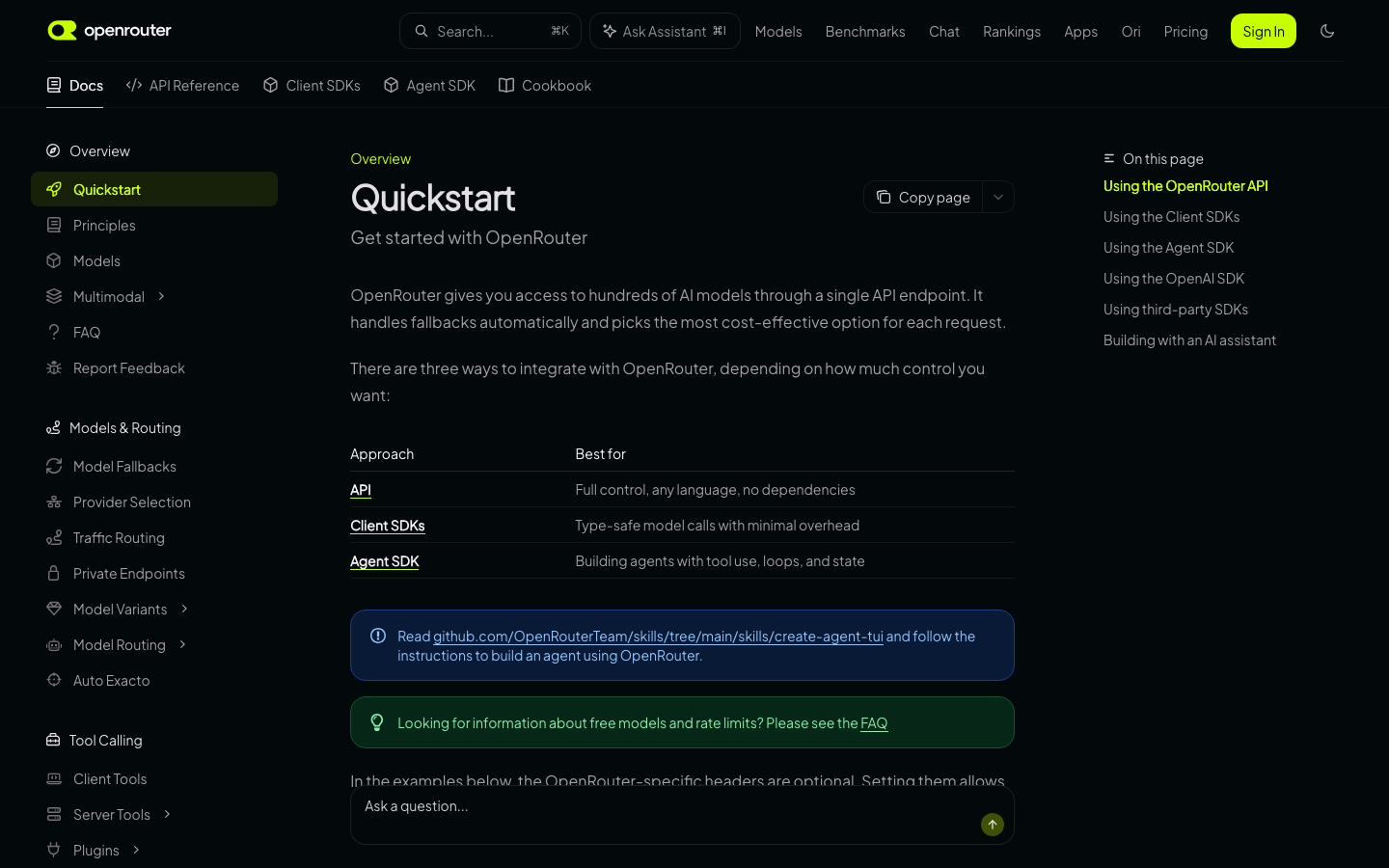
Section titled “3. Human pass findings (2026-11-07, screenshots)”Screenshots: landing (/docs redirects to Quickstart, so it is the same image as the guide), guide, reference with “Try it”, search, assistant, light, dark, mobile guide, mobile menu.
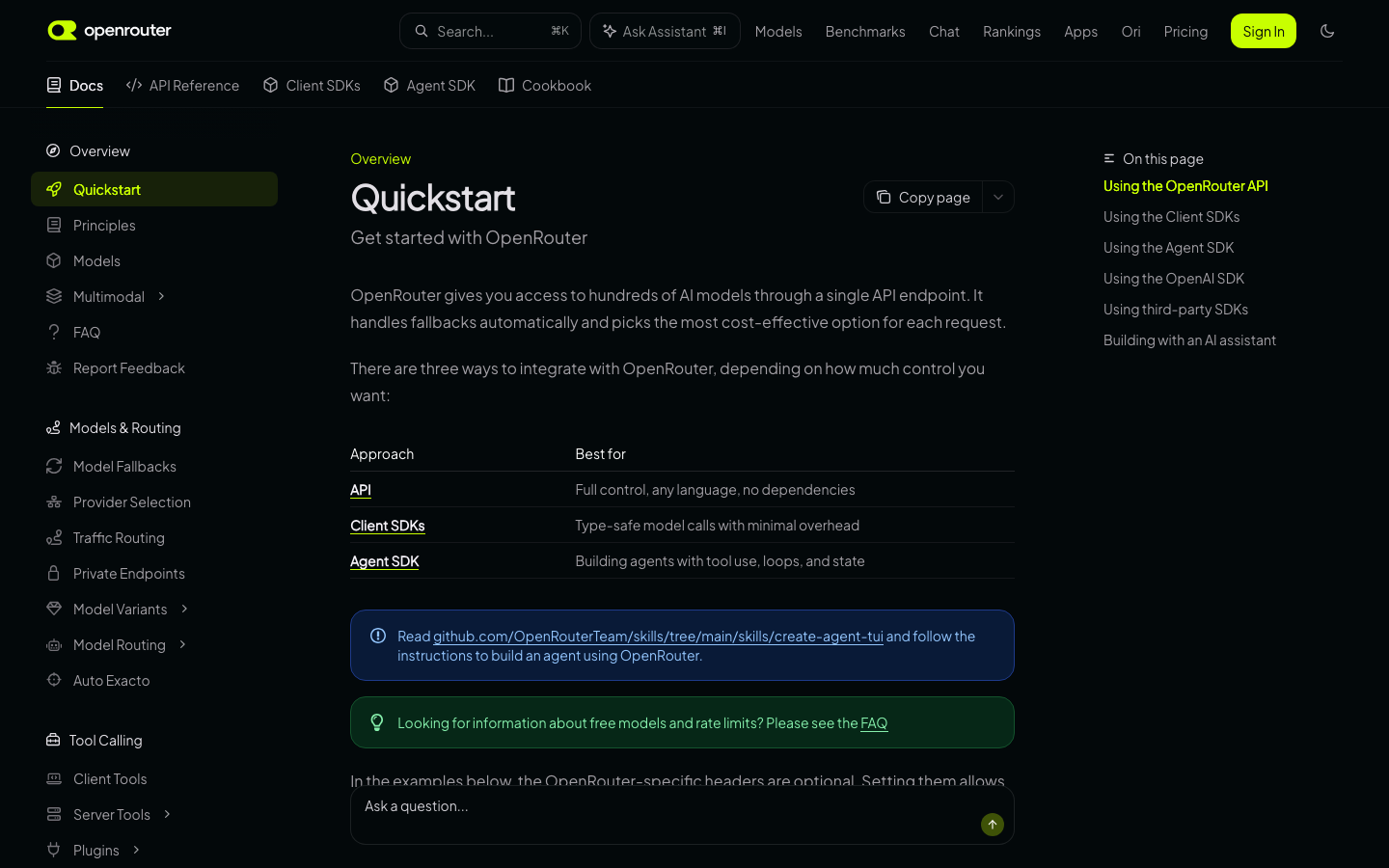
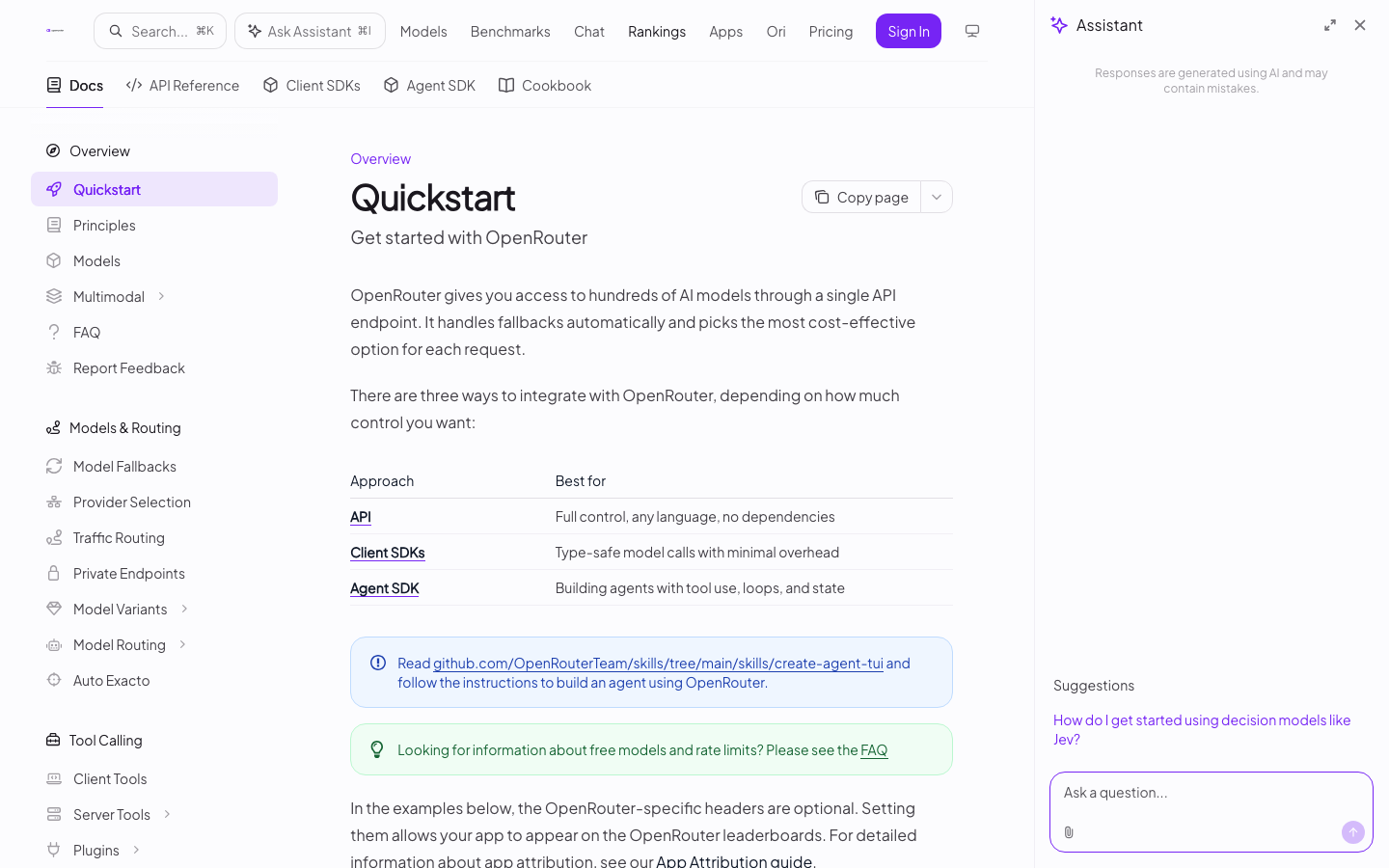
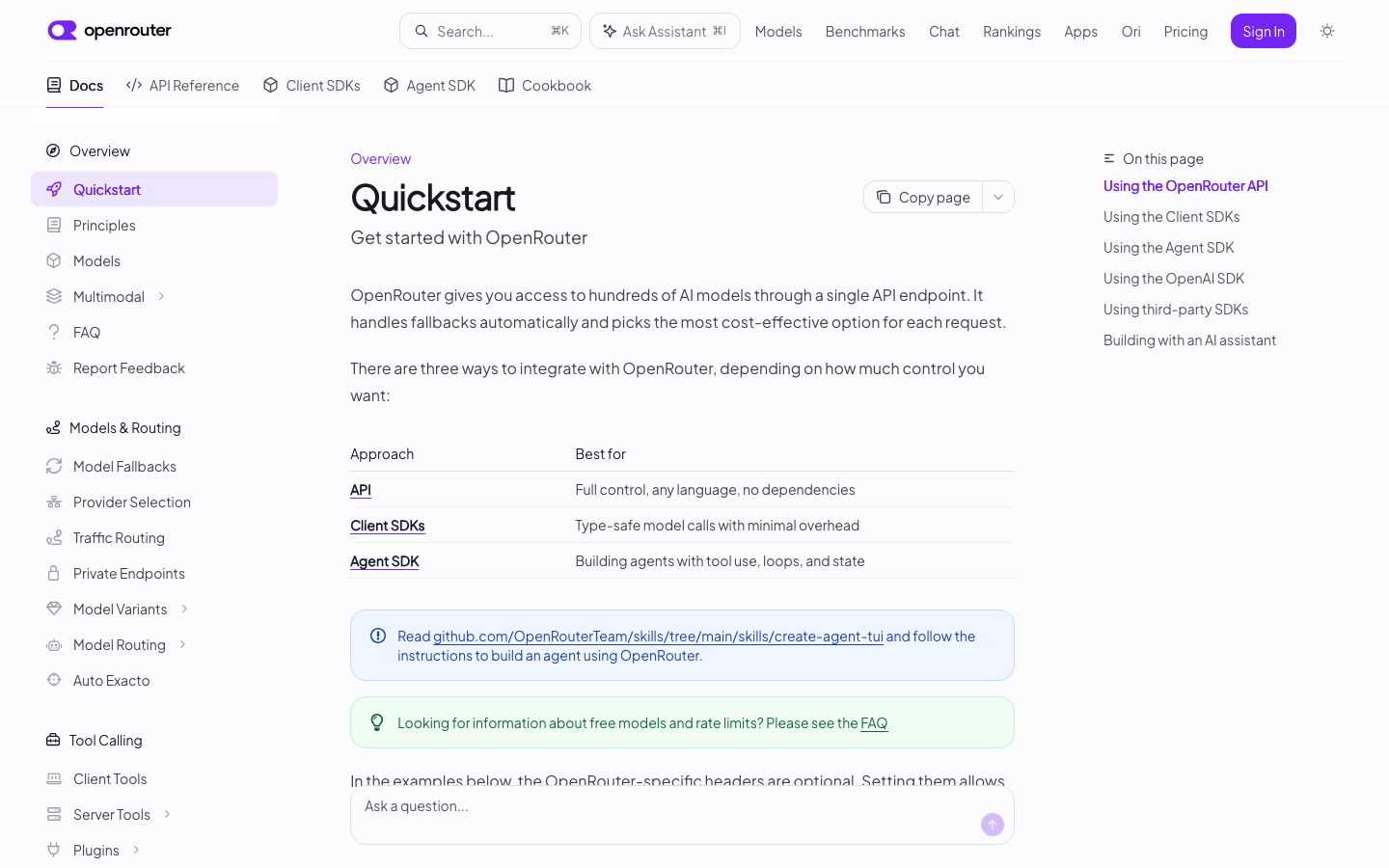
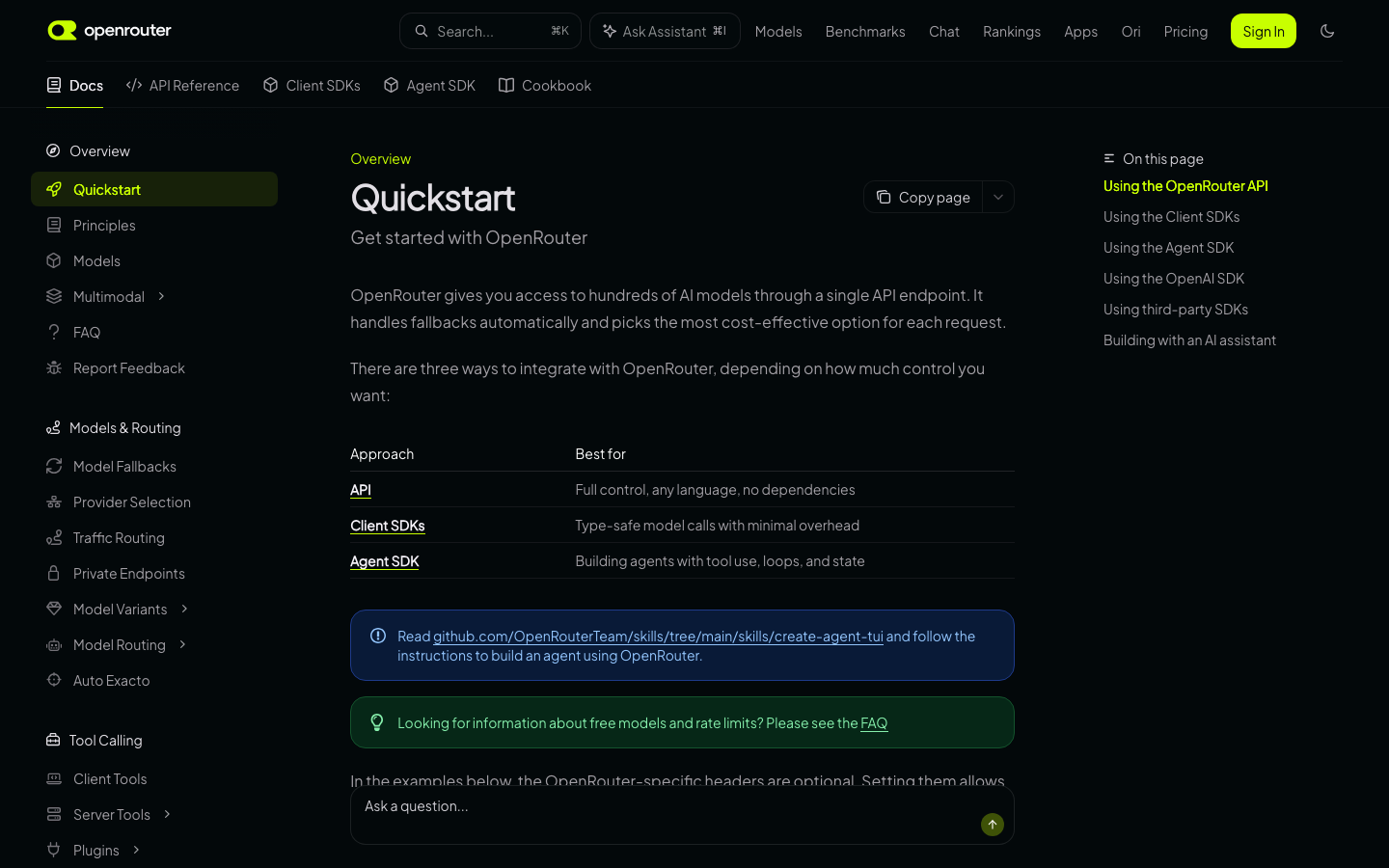
Navigation (seen). Two header rows. Row one: logo, search box (Cmd+K), “Ask Assistant” button (Cmd+I), site links (Models, Benchmarks, Chat, Rankings, Apps, Ori, Pricing), Sign In, theme icon. Row two: five tabs with icons (Docs, API Reference, Client SDKs, Agent SDK, Cookbook), active tab underlined. Left sidebar: icon-headed groups, chevrons on groups that expand, active page in a tinted pill. The sidebar scrolls on its own.
Page layout (seen). Three columns: sidebar, centred prose column, “On this page” list on the right with the active heading in the accent colour. Each page starts with a small section label in the accent colour, a large title and a one-line subtitle. Callouts are rounded boxes with an icon: blue for info, green for tips. Tables are plain, with rules between rows.
Ask box (seen). A floating “Ask a question…” input sits at the bottom of every guide page. It covers the last lines of text on a short viewport.
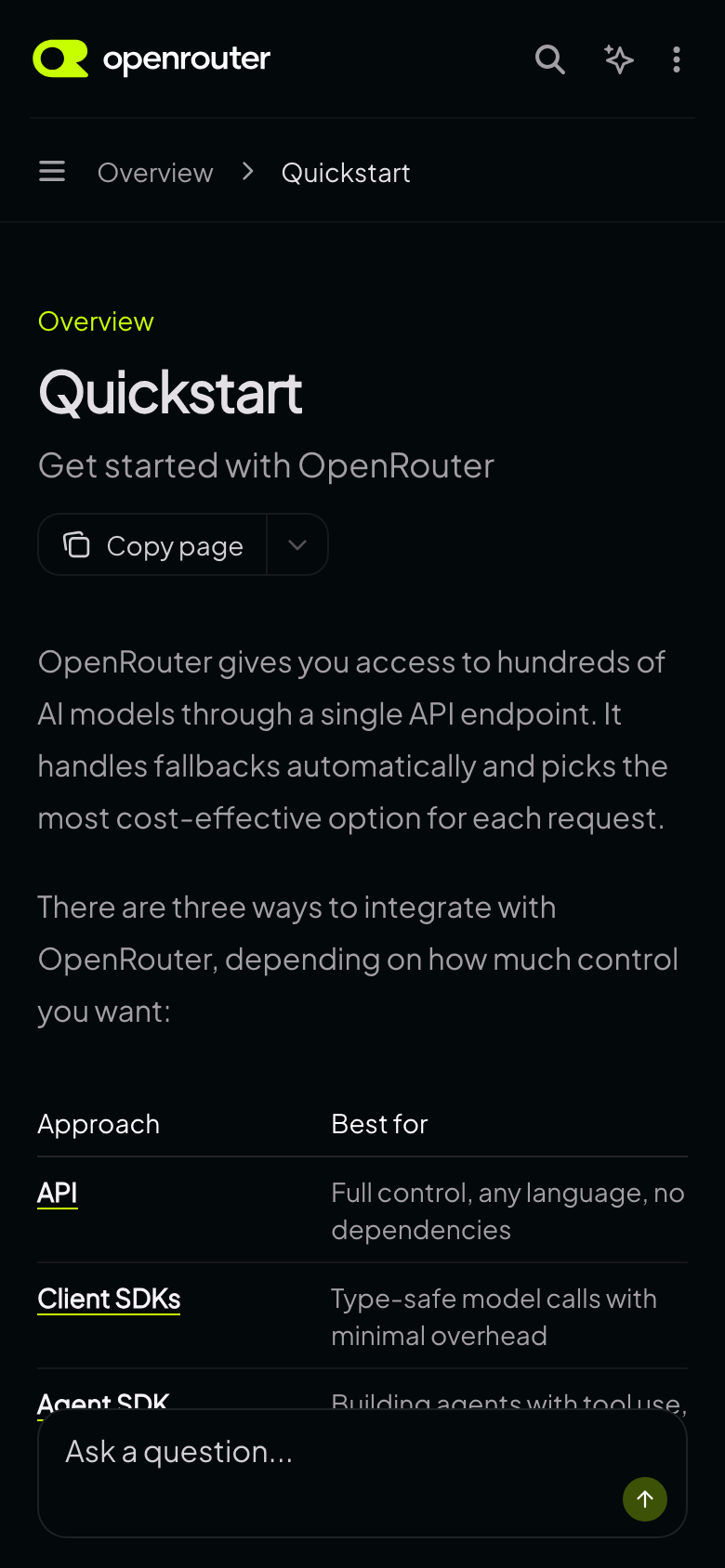
Page-action menu (seen). A split button to the right of the title: “Copy page” plus a chevron for the other options. On mobile it moves under the subtitle.
Search (seen). Cmd+K opens a centred panel under the search box. Results are one row each: a page or heading icon, the title, and a breadcrumb (tab, group, page) with matches highlighted in the accent colour. Page hits and heading hits are mixed, about six in all. Below them is an “Ask Assistant” group with a suggested question (“Can you tell me about streaming?”). A footer shows the keys: select, open, close. Control+K also works.
Assistant panel (seen). Opens as a right-hand panel from the “Ask Assistant” button. It pushes the page left and hides the “On this page” list. Parts: title, maximise and close buttons, a “Responses are generated using AI and may contain mistakes” note, one suggested question, and an input with an attach button.
API reference and “Try it” (seen). The “Try it” button opens a large modal over the page, not a side panel. Left half: method and endpoint picker, a bearer-token field, collapsible Authorization, Header and Body groups, a Form/JSON switch, and “Expand N optional fields” rows. Right half: a request snippet with a language picker (cURL first) and a copy button, then the 200 response example with a status dropdown. A blue “Send” button sits at the top right.
Code blocks (seen). Dark panel with a tab bar for the language, a copy button and an “Ask Assistant” button on each block, and “See all N lines” on long ones.
Theme (seen). The default is dark whatever the device preference is: with the OS set to light the site still loaded dark. A theme button in the header opens System, Light and Dark. On mobile the three sit in a pill at the top of the drawer. The choice is stored in localStorage (isDarkMode). Dark uses a near-black background and a lime accent. Light uses white, a purple accent and tinted callouts, and the logo mark and Sign In button change colour with the theme. Ours follows the device by default (row 18).
SDK and language persistence (seen). Tested on the streaming page. Clicking Python switched every code group on that page at once. After a full page load of another page with tabs, Python was still selected. The choice is stored in localStorage under the key code. Tabs are matched by label, so the label must match across pages. On the Quickstart the first tab is Python, but on the streaming and tool-calling pages the default is “TypeScript SDK” and the labels differ (“TypeScript (fetch)”). Our plan: same behaviour, with one fixed set of labels. Other keys set: isDarkMode, mintlify_anonymous_id, PostHog and _gcl_ls (analytics).
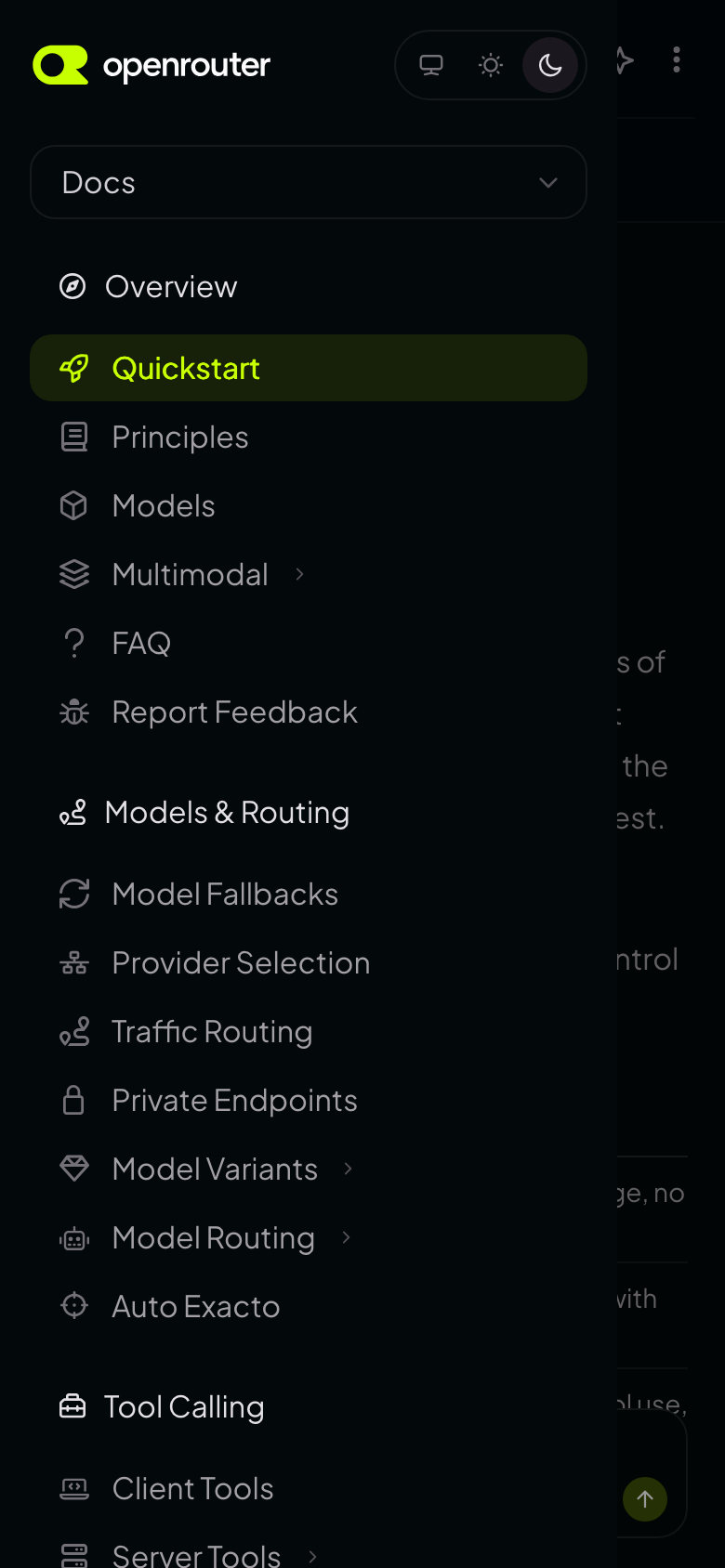
Mobile (seen). Header: logo, search icon, assistant icon, three-dot menu. Under it a breadcrumb bar with a hamburger at the left. The hamburger opens a left drawer that covers about 85% of the width and leaves the page showing behind it. The drawer holds the logo, the theme pill, a tab dropdown (“Docs”) and the full sidebar. The page-action menu sits under the subtitle. Tables wrap their cells. The “On this page” list is behind a button on the breadcrumb bar.
MCP (row 21). Resolved: skip. See the row.
Layout facts for the mockups (HTML values, confirmed by the screenshots where noted)
| Item | What we know |
|---|---|
| Sidebar | Fixed left, 18rem (288px) (seen: about 290px); starts below both header rows |
| Header | Two rows, about 112px in all (seen) |
| Table of contents | Right column, 16.5rem, titled “On this page”; hidden when the assistant panel is open (seen); hidden below the xl breakpoint |
| Content width | Prose column about 690px (seen), container max-w-8xl |
| Page-action menu | Right of the title above 520px, under the subtitle on mobile (seen). The menu list itself was not opened. HTML says: Copy page, View as Markdown, ChatGPT, Claude, Perplexity |
| Mobile nav | Left drawer with the sidebar, opened from a breadcrumb-bar hamburger (seen) |
Not checked. The page-action menu list opened on screen, and the Try it request when sent (needs an API key).